

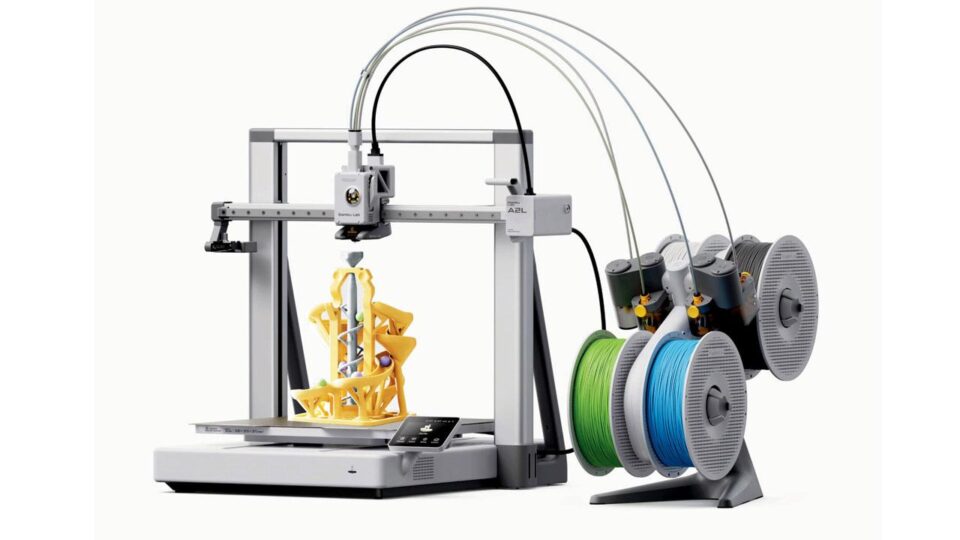
I have 3D printed on plenty of machines over the years, but this is my first real stint with a Bambu Lab printer. I get the hype now.
The A2L takes a hobby that can involve levelling beds, adjusting temperatures, clearing blocked nozzles, and swearing at failed first layers, and turns it into something close to a regular appliance. It even got my family excited to print something for the first time.
Some assembly is required, but Bambu Lab makes it painless. The instructions are clear, and every set of screws comes in its own labelled bag. It was easy enough for a 10-year-old to assemble, which is exactly why I used the free child labour available at home. My only gripe: attaching the AMS Lite’s filament tubes to the print head could use more explanation.
The rest is straightforward. Load filament, let it calibrate, and it’s ready to print.
The A2L has a generous 330 x 320 x 325mm build volume, direct-drive extruder, auto bed levelling, a heated textured PEI plate, Wi-Fi, and a 3.5-inch touchscreen. Footprint is 544 x 529 x 505mm, weight 12.8kg. Its open-frame design suits PLA, PETG, and TPU.
That large build plate is one of its biggest strengths. Big objects without splitting the design, or a bed full of smaller ones. Despite the size, prints come out remarkably clean.
Bambu Studio helps a lot too. Approachable for beginners, capable enough for experts. Paired with the Bambu Handy app, finding, prepping, and sending a model feels far less fiddly than on rival machines.
The built-in camera makes great timelapses. Watching an object grow out of the bed never gets old. The live feed is less impressive, with a low frame rate and an angle that doesn’t always show the whole bed. It is fine for checking if the printer has started manufacturing a plastic spaghetti monster, less useful for diagnosing smaller problems remotely.
Pros
Excellent print quality with a large build areaVery easy to assemble, calibrate, and useAMS Lite and optional cutting tools add plenty of creative flexibility
Cons
The printer and AMS Lite need a lot of desk spaceAMS Lite leaves filament exposed to humidityCutting software, instructions, and blade-changing experience need refinement
More colours, more poop
The AMS Lite holds four spools and auto-feeds the chosen colour. With Bambu’s tagged filament, it even identifies colour and material itself. Loading is dead simple. Spool on the spindle, feed the filament, done.
Multicolour printing is where the A2L becomes a family attraction as the results with four colours can be spectacular.
There’s a cost beyond extra spools, though. The AMS Lite is also handy beyond multicolour work, letting you keep several materials loaded and auto-switch when one spool runs out.
Its open design has a downside. No protection from moisture, which matters in a humid city like Mumbai. Damp filament turns brittle and prints poorly. You’ll want proper storage, dry boxes, or the pricier AMS 2 Pro, which adds drying and can even run alongside an AMS Lite.
A printer with stationery ambitions
The optional cutting and pen kit adds a whole new dimension. Installation is simple. Remove the front cover and control dial, attach the module, connect it, swap in the adhesive cutting mat.
Unfortunately, no instruction booklet came with it. I had to watch Bambu Lab’s YouTube guide. The cutting workflow also runs through Bambu Suite rather than the familiar Bambu Studio, and positioning designs needs a phone photo since the A2L has no overhead camera. It works, but feels noticeably less polished than the 3D printing side.
Skip generic printer paper, even on the light-grip side of the mat. Thin paper plus sticky surface ended in disaster for me. I couldn’t lift the cut design cleanly, and the pen dumped ink wherever it paused, making a mess. Heavier stock (120gsm+), sticker paper, or vinyl should work much better.
The blade deserves respect. It’s properly sharp, and swapping it for the pen feels a little terrifying since you handle the module while its cover is off. Not a job for the aforementioned child labour.
Still, the cutter and plotter are excellent additions, letting the A2L make stickers, paper designs, labels, and heat-transfer vinyl without a separate Cricut-style machine. It doesn’t seem readily available locally yet, but it’s worth grabbing once it is. Bambu Lab just needs to give the cutting software and docs the polish it’s given 3D printing.
The other big limitation is space. The printer is already large, its moving bed needs extra clearance, and the AMS Lite expands things further. Not something you casually squeeze onto a corner of a desk. The open frame also rules out demanding filaments like ABS, ASA, and nylon, which generally want an enclosure.
At Rs 65,999 for the AMS Lite combo (without the cutting kit), it’s not cheap. But that buys exceptional print quality, a huge bed, great software, and an experience simple enough to pull the rest of the family in. The cutter and pen tools add even more value, potentially saving craft fans from buying a second machine altogether.
The Bambu Lab A2L is a great 3D printer with a very capable cutter and plotter bolted on. Not perfect, the accessories and software need work, but the clean prints, ease of use, and huge build area are exceptional. The important part, it made 3D printing fun again.
Bambu Lab A2L ComboPrice: Rs 65,999Bambu Lab cutting/pen kit Price: Rs 9579
